
usBIM.viewer — Free IFC Viewer. No Download. No Expiry.
Open Any IFC File. In Your Browser. For Free.
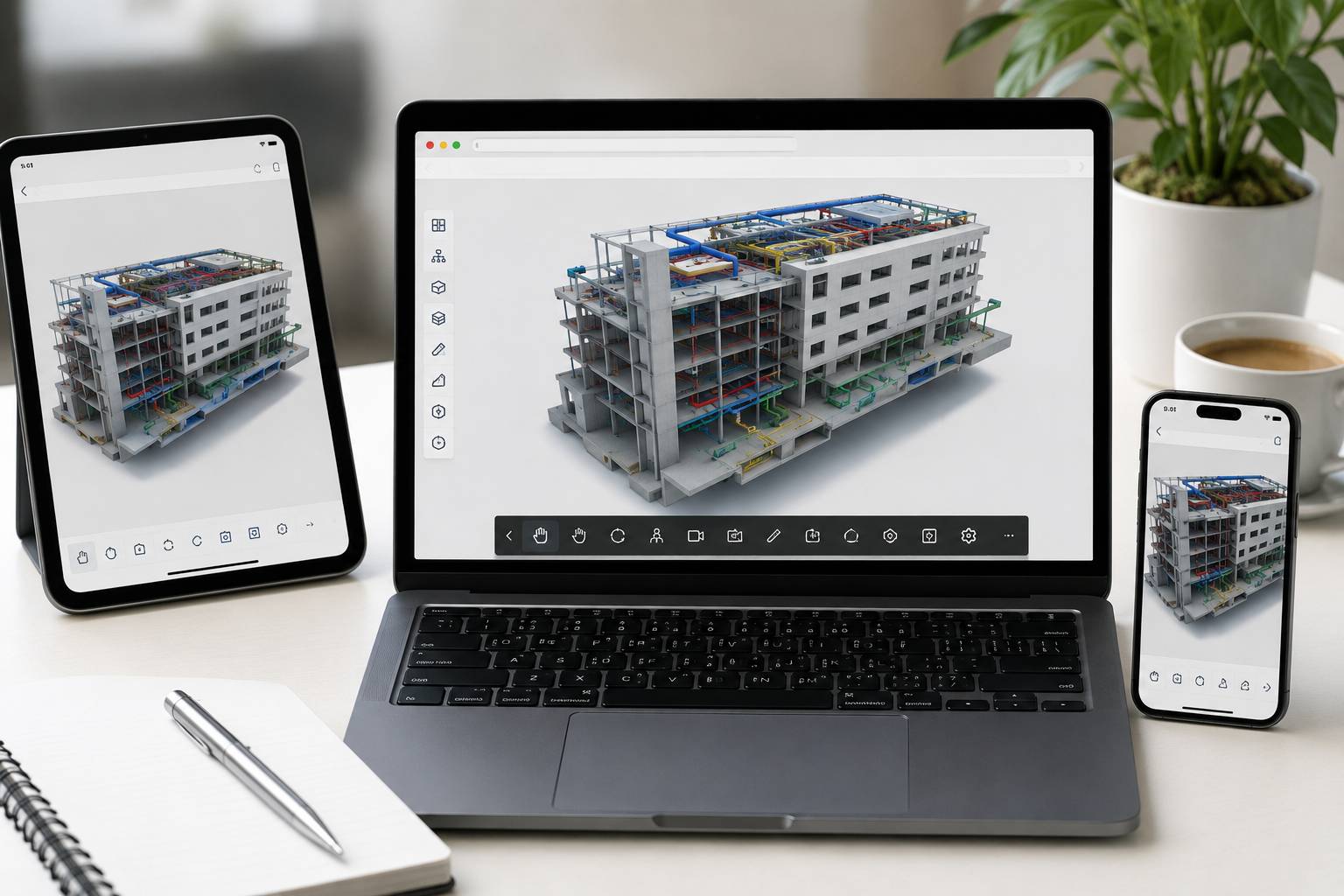
usBIM.viewer is the free IFC viewer that lets you open, navigate, and manage BIM models of any size and format — directly in your browser, from any device, with no download, no installation, and no time limit. The browser-based IFC viewer used by AEC professionals worldwide to access, review, and share BIM model data without software dependencies.
Free Access CalloutPermanently free. No credit card required. Includes 10GB cloud storage and access to a complete range of online BIM tools — all free with usBIM registration.
Certification CalloutbuildingSMART International® Certified Software — IFC viewer capability verified to the global openBIM standard.
Trust Statement Before technology, there had to be a relationship. ACCA software and Isotech work alongside AEC teams across the GCC — coaching and supporting your adoption of professional BIM workflows from day one.
Value Pillars
Free IFC Viewer. Permanently. No Strings.
Open IFC files of any size, from any BIM authoring software, in any browser — completely free with no time limit. The free IFC file viewer with no download, no installation, and no subscription required to get started.
Value
Online IFC Viewer. Any Device. Any Location.
A browser-based IFC viewer that works on PC, Mac, tablet, and smartphone. No local software. No version management. Access your BIM models from anywhere — the online IFC viewer that goes wherever your project does.
More Than a Viewer. Edit, Federate, and Manage.
Assign and modify IFC properties, federate multiple models, manage BCF issues, and check model quality — all within the same free IFC viewer environment. More capability than most paid tools.
10GB Cloud Storage. Included Free.
Every registered usBIM user gets 10GB of cloud storage for IFC files, BIM models, and project data — permanently, with no payment required. Store, access, and share your BIM models from any device.
Isotech Support from Day One
Isotech coaches and supports BIM teams across the GCC from first registration through full BIM workflow adoption. Before technology, there had to be a relationship.
Why Every AEC Professional Needs an IFC Viewer
IFC Is the Language of BIM.
Your Viewer Should Speak It Fluently.
IFC — the open international standard for BIM data exchange — is now the required format for every major BIM project across the GCC and wider MEA region. Government procurement mandates, openBIM coordination workflows, and EN ISO 19650 information management requirements all depend on the ability to open, review, and manage IFC files reliably.
Accessing an IFC file shouldn't mean owning expensive software or asking someone else to produce a PDF. Every stakeholder deserves direct access to BIM model data — regardless of their role, their software, or their location.
usBIM.viewer — Permanently Free. No Download Required.Yet for many project stakeholders — government representatives reviewing design submissions, contractors reviewing coordination models, facility managers accessing handover records, or clients reviewing progress presentations — accessing an IFC file means either owning expensive BIM authoring software or asking someone else to produce a PDF.
usBIM.viewer solves this. As a permanently free IFC viewer with no download requirement, it gives every project stakeholder — regardless of their role, their software, or their location — direct access to BIM model data in its original IFC format. No intermediaries. No format conversions. No lost information.
Core Capabilities
The Free IFC File Viewer That Does Significantly More Than View.
usBIM.viewer opens IFC files produced with any BIM authoring software — Revit, ArchiCAD, Edificius, Allplan, Tekla, SketchUp, and all other IFC-certified tools — and renders them in the browser with high-performance navigation that large and complex BIM models require.
Navigate the 3D model with pan, orbit, zoom, and section cut tools. Select individual objects to inspect their IFC properties and classifications. Search, filter, and highlight elements by object type, property value, or any other attribute.
IFC 2x3, IFC4, and IFC4.3 are all supported — covering every IFC version in current use across the GCC and wider AEC market. There is no size limit on the files the online IFC viewer can handle — open large, complex models with the same performance as smaller files.
usBIM.viewer is not a read-only tool. Import IFC files from any BIM authoring tool. Export modified IFC files for sharing with consultants, authorities, or downstream workflow tools.
The web IFC viewer that works in both directions — receiving models from every tool and returning them in the open format every tool can read.
Open multiple IFC files simultaneously and view them as a federated model — combining architectural, structural, MEP, and infrastructure models from different disciplines and different authoring tools in a single coordinated view.
For GCC project teams managing multidisciplinary coordination — where each consultant delivers an IFC model independently — the federation capability means every team member can view the coordinated project model without needing a dedicated BIM coordination platform.
Assign and modify property sets and attribute values for any IFC object. Apply standard classification systems including Uniformat, Uniclass, Omniclass, and others. Create selection groups and filters, and insert new objects from the ACCA online BIM object library.
Correct property data before sharing, enrich models with classification information, and prepare IFC files for specific information exchange requirements — without needing a dedicated IFC editor.
Manage BIM issues directly within the free IFC viewer using the BCF (BIM Collaboration Format) standard — creating, assigning, and tracking design issues with visual references attached to specific model elements.
BCF files are exportable to any BCF-compatible BIM authoring tool, allowing issues identified in the viewer to be resolved in the originating design software. Issues identified during model review are documented formally and routed to the right designer without a separate issue management tool.
Check the quality of any IFC model — verifying IFC structure, identifying missing properties, and flagging potential issues before the model is submitted to a coordination review or an authority approval process.
Run basic interference checks between multiple federated models to identify obvious clashes before a dedicated BIM clash detection analysis. For GCC project teams where IFC model quality varies between consultants, this provides a first-pass review that catches obvious issues before they reach the formal coordination process.
Compare two versions of the same IFC model — identifying what has changed between design iterations, which elements have been added, removed, or modified, and how property data has evolved between versions.
Essential for design review workflows where tracking changes between model submissions is a project management and contractual requirement.
IFC Viewer No Download. Any Device.
The IFC Viewer No Download, No Installation, No Version Update — Ever.
usBIM.viewer is a fully browser based IFC viewer — there is nothing to install, nothing to update, and no dependency on a specific operating system or hardware configuration.
Open the browser. Log in to usBIM. Open your IFC file. That is the entire workflow.
This matters practically for GCC project teams and their stakeholders. Government representatives reviewing design submissions do not need to install BIM software. Clients attending progress presentations do not need a laptop with the right software version. Site managers checking coordination models on a tablet do not need a desktop application. Facility managers accessing as-built records years after project completion do not need to maintain obsolete software.
The online IFC viewer works on Windows, Mac OS, iOS, and Android — on desktop, laptop, tablet, and smartphone — from any browser, from any location with an internet connection. The free IFC viewer that removes every access barrier from BIM model review.
Registration for usBIM gives every user permanent free access to a full suite of professional BIM tools — no trial period, no credit card, no expiry.
For GCC project teams looking for a professional free IFC file viewer as their starting point — and for organisations exploring BIM adoption without an upfront software investment — the usBIM free tier provides immediate, professional-grade BIM capability with no financial commitment required.
Isotech Differentiator
A Free IFC Viewer Backed by ACCA — The World's Number One IFC-Certified openBIM Expert. Supported by Isotech Across the GCC.
usBIM.viewer is free IFC viewer software from ACCA — the world's number one IFC-certified openBIM expert, with more buildingSMART International certified BIM software solutions than any other company globally. As Isotech, we bring the complete usBIM platform to AEC firms, government project teams, and infrastructure developers across the Middle East and Africa.
For organisations beginning their BIM journey, usBIM.viewer is the no-barrier entry point — try the free IFC viewer, understand what BIM data looks like, and begin using BIM model data in your project workflows today. For organisations ready to scale, Isotech provides the coaching, configuration, and long-term support to build on that foundation.
"Before technology, there has to be a relationship. We work alongside your teams to ensure successful adoption, measurable value, and long-term operational success."
What Our Testimonials Say

Marcin Pszczolka
Poland • Civil Design Lead
Pierpaolo Canini
SwitzerlandVictor Fuentes
Chile
David Quevedo
Ecuador
Marcin Pszczolka
Poland • Civil Design Lead
Pierpaolo Canini
SwitzerlandVictor Fuentes
Chile
David Quevedo
EcuadorTechnology Partner
We are proud to partner with ACCA Software, a global provider of BIM, digital construction, and Common Data Environment (CDE) solutions. Through this collaboration, we leverage advanced technologies that support ISO 19650-compliant workflows, streamline project coordination, and enhance information management across the entire project lifecycle.
This partnership enables us to deliver innovative, scalable, and industry-aligned solutions that help clients improve collaboration, efficiency, and project outcomes.
Questions Worth Answering Up Front.
Is usBIM.viewer really free with no time limit?
Yes. usBIM.viewer is permanently free — no time limit, no credit card required, no subscription needed to access the core IFC viewer capability. Register for usBIM, and the free IFC viewer is available immediately, along with 10GB of cloud storage and a full suite of free BIM tools. There is no trial period and no expiry date on the free access. Optional paid apps and additional storage are available if your project requirements grow beyond the free tier, but the core free IFC file viewer capability remains free indefinitely.
Do I need to download anything to use this IFC viewer?
No. usBIM.viewer is a browser-based IFC viewer; it runs entirely in the browser with no download, installation, or plugin required. Open the browser, log in to usBIM, and upload or open your IFC file. The IFC viewer no-download approach means it works on any device and any operating system — Windows, Mac, iOS, Android without any local software dependencies or version management.
What IFC file formats and sizes does usBIM.viewer support?
usBIM.viewer supports IFC 2×3, IFC4, and IFC4.3 — all major IFC versions in current use. It opens IFC files produced with Revit, ArchiCAD, Edificius, Allplan, Tekla, SketchUp, and all other IFC-certified BIM authoring tools. There is no file size limit — the online IFC viewer handles large and complex models with the same performance as smaller files, making it suitable for the large federated models common on major GCC infrastructure and development projects.
Can usBIM.viewer open multiple IFC files as a federated model?
Yes. The web IFC viewer supports model federation — opening multiple IFC files simultaneously and displaying them as a single coordinated model. This allows architectural, structural, MEP, and infrastructure models from different disciplines to be viewed together without a dedicated BIM coordination platform. For project teams reviewing multidisciplinary models, the federation capability of the free IFC viewer provides an accessible entry point into coordinated BIM model review.
Is the free IFC viewer suitable for professional use on GCC projects?
Yes. usBIM.viewer is buildingSMART International certified — independently verified against the international IFC standard. It is used by AEC professionals globally for design review, coordination meetings, authority submissions, client presentations, and project handover. For GCC project teams at any stage of BIM adoption, from first-time IFC file review to full openBIM coordination workflows, the free IFC file viewer provides professional-grade capabilities that meet the quality and reliability standards required by GCC procurement and project management environments.
What is the difference between the free IFC viewer and the full usBIM platform?
The Free IFC Viewer That Opens Every BIM Model — In Your Browser, Right Now.
usBIM.viewer is the permanently free IFC viewer that removes every access barrier from BIM model review — no download, no installation, no software dependency, no cost. Open any IFC file, from any BIM authoring tool, on any device, from any location. Backed by ACCA’s global openBIM leadership and Isotech’s regional coaching and support across the GCC.
Register free. Open your first IFC file. Build with Isotech alongside you.
“Technology creates possibilities. Relationships create successful outcomes.”