
usBIM.clash — BIM Clash Detection Software

Find Every Conflict in the Model Before It Becomes a Problem on Site.

usBIM.clash is certified BIM clash detection software that identifies interferences across all discipline models — automatically, in any IFC format — so your team resolves conflicts at design stage, not during construction. Available as a desktop application and as an online clash detection tool within the usBIM platform.

Certification Callout buildingSMART International® Certified — IFC clash detection verified to the global openBIM standard.

Trust Statement Before technology, there has to be a relationship. ACCA software and Isotech work alongside BIM coordinators, engineers, and project teams across the GCC — coaching and supporting your adoption of professional BIM coordination software at every step.

Value Pillars

Core Value
01

Automatic Clash Detection IFC

The best BIM clash detection software runs automatically — identifying hard clashes, clearance clashes, and workflow clashes across federated IFC models without manual visual review. buildingSMART International certified for IFC clash detection.

02

Online Clash Detection Tool

Use usBIM.clash as a fully integrated online clash detection tool within the usBIM platform — from any browser, any device, with no download required.

03

BIM Model Coordination

Architecture, structure, MEP, and infrastructure — all federated and coordinated in one environment. Connect every discipline model and identify every interference before construction begins.

04

BCF Export & Resolution

Export clash reports in BCF, PDF, XML, CSV, or XLSX. Every designer resolves issues within their preferred BIM authoring tool through a shared coordination process.

05

Supported by Isotech

Isotech coaches and supports BIM coordination teams across the GCC — from deployment and workflow setup through long-term technical assistance.

The Cost of Undetected Clashes

Every Rework on Site Was a Clash That Was Visible in the Model.

Construction rework is one of the most expensive and avoidable costs in any AEC project. A duct cutting through a structural beam. A pipe running through a wall opening that was never modelled. Two systems occupying the same physical space.

Each of these conflicts existed in the federated BIM model before a single element was fabricated — but without systematic automatic clash detection IFC analysis, they went undetected until they became a site problem.

Industry data consistently shows that clashes identified during construction cost five to ten times more to resolve than the same conflicts caught at design stage.

For large infrastructure and development projects across the GCC — where programme pressure is intense and the financial exposure on a major clash is significant — the case for BIM clash detection software becomes the case for avoiding cost and delay.

usBIM.clash moves conflict discovery from site to screen — automatically, across every discipline, at every design iteration.

COST IMPACT
5x–10x

Clashes discovered during construction cost substantially more to resolve than those identified at design stage.

Hard Clash Detection
Clearance Analysis
Workflow Clash Detection
Federated IFC Models
Cross-Discipline Review
Automatic Detection

Move Conflict Discovery From Site To Screen

Automatically detect issues across every discipline model before they become expensive construction problems.

What Is BIM Clash Detection?

Three Types of Clash. One Platform to Find All of Them.

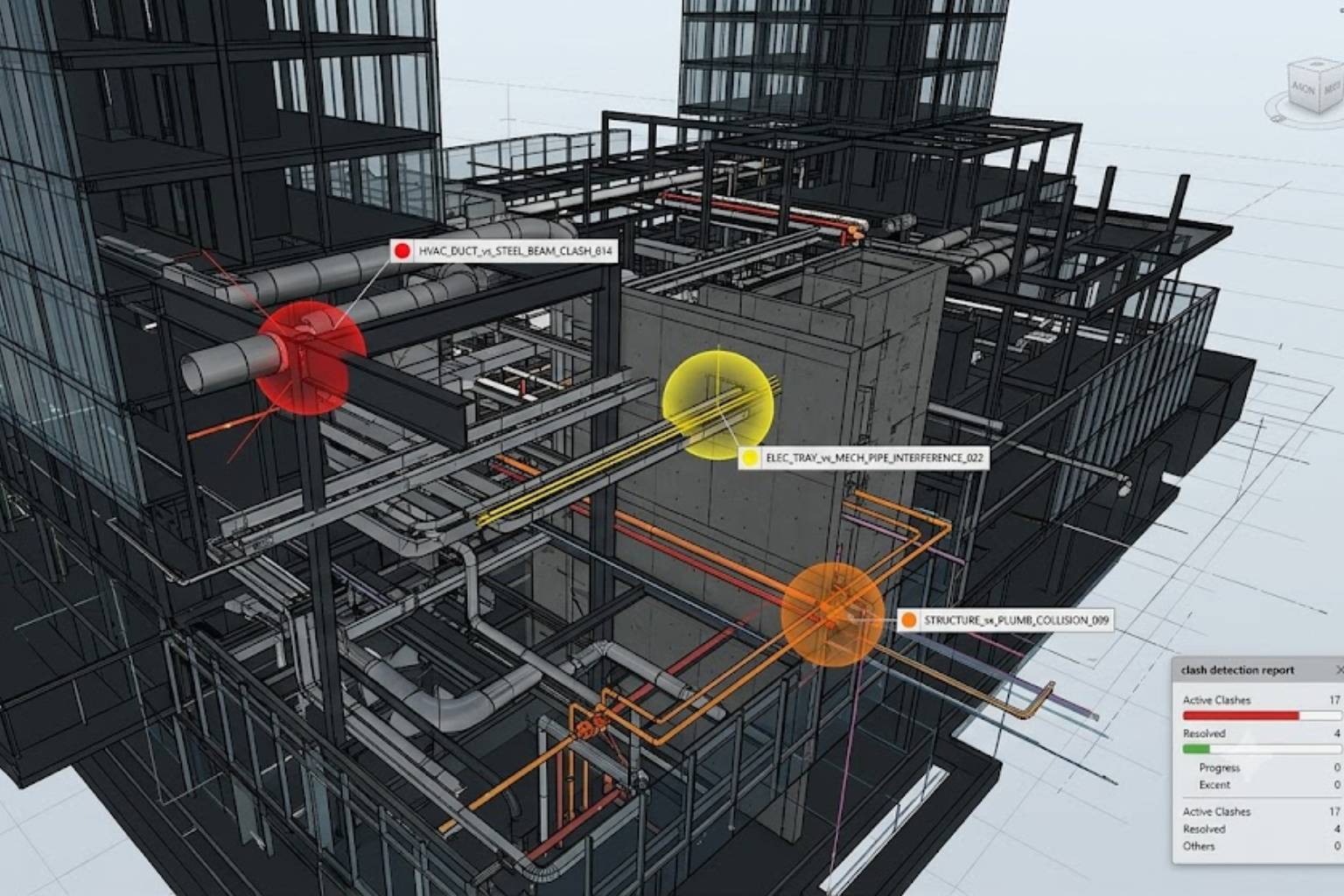
BIM clash detection is the process of identifying conflicts between elements in a federated BIM model before construction begins. usBIM.clash detects all three categories.

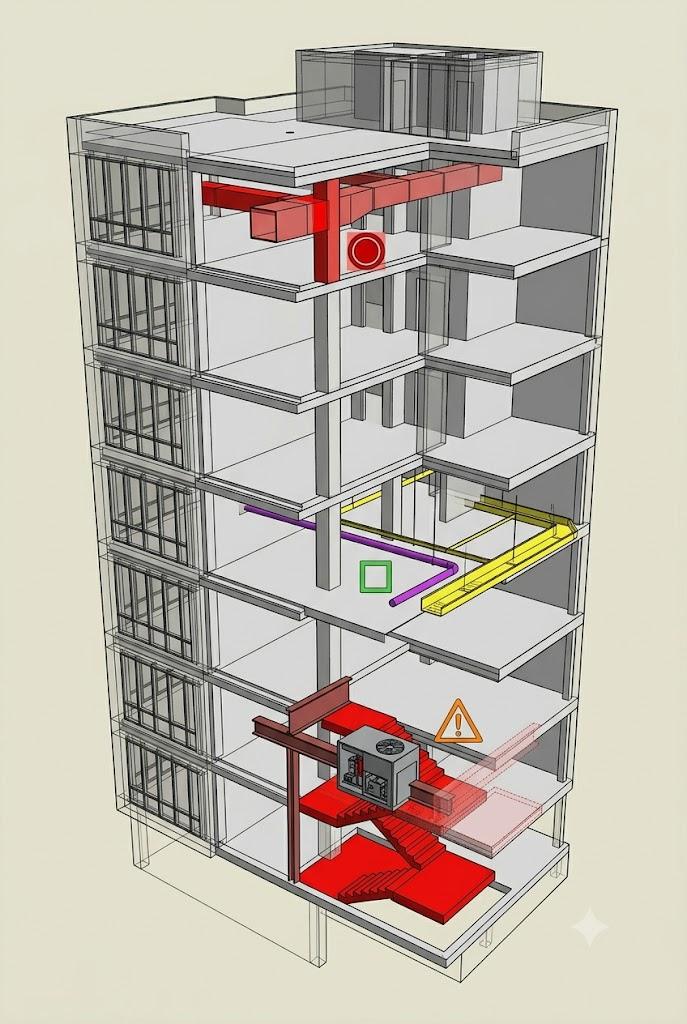
Hard Clash Two elements physically occupying the same space — a duct crossing a structural beam, a column intersecting a wall, a pipe running through a slab without an opening. Hard clashes are the most common and the most immediately costly when discovered on site. Automatic clash detection IFC analysis finds every one of them across the full federated model without visual review.

Soft Clash / Clearance Clash Two elements that do not physically overlap but are positioned closer together than standards, maintenance requirements, or assembly procedures allow. Clearance clashes are invisible to visual inspection — they require parametric analysis against configurable tolerance values. usBIM.clash provides the ruleset interface to define and detect every clearance condition your project requires.

Workflow Clash / 4D Clash An element that physically cannot be installed given the construction sequence — large plant equipment that cannot pass through available openings once the surrounding structure is complete, or a component whose installation window closes before access is available. Workflow clashes are the most complex and the most costly when discovered late. usBIM.clash detects all three categories in a single BIM coordination software session.

How usBIM.clash Works

Automatic IFC Clash Detection. Configurable Rules. Dynamic Results.

Open your discipline-specific IFC models in usBIM.clash — from Revit, ArchiCAD, Allplan, Tekla, Edificius, AutoCAD, or any IFC-certified authoring tool.

Federate them into a single coordinated model. Apply Selection Groups and Selection Filters to define exactly which disciplines and entity types each analysis run should examine.

Set the clash type, comparison criteria, and tolerance values. Run the analysis.

The result is a structured clash detection report — every conflict identified, its type, the elements involved, and its location in the 3D model.

As an online clash detection tool within the usBIM platform, every analysis run is stored in the cloud and accessible to authorised team members. Results automatically update whenever new IFC versions are issued.

IFC
Multi-Tool Support
3D
Dynamic Clash View
Live
Cloud Updates
Clash Detection Workflow
Import IFC Models

Revit, ArchiCAD, Tekla, Allplan and other IFC-certified BIM tools.

Selection Filters

Target specific disciplines and entity groups for structured analysis.

Configurable Rules

Set clash types, tolerance values and comparison criteria.

Dynamic Results Matrix

Click any clash and automatically locate elements inside the 3D model.

Continuous Updates

Run saved rules automatically whenever IFC versions change.

Why usBIM.clash Is the Best BIM Clash Detection Software

Certified. Flexible. Connected to the Full BIM Coordination Workflow.

Three things distinguish usBIM.clash from other clash detection software options in the market.

01

buildingSMART International Certification

usBIM.clash is certified by buildingSMART International for IFC clash detection — independently verified against international openBIM standards. For GCC project teams delivering BIM-compliant projects or government tenders, this provides assurance that clash analysis and IFC exchange are accurate and reliable.

IFC Certified
02

Available Desktop & Online

Use desktop mode for intensive sessions with large models, or use the online clash detection tool for distributed teams needing access from anywhere without installation requirements.

Cloud + Desktop
03

Integrated BIM Coordination Ecosystem

Connect clash detection directly with IFC validation, common data environment workflows and team communication tools. Discussion happens in the same environment as the model without platform switching.

Connected Workflow

Collaborative Clash Resolution

Every Clash Assigned. Every Resolution Tracked. Every Update Reflected.

Detecting a clash is the beginning of the coordination process. The conflict must be communicated to the right designer, understood in context, assigned for resolution, and confirmed as resolved when the model is updated. usBIM.clash closes this loop.

Each detected issue is enriched with notes, comments, and screenshots of the conflicting elements — giving the responsible designer the full context needed to understand and resolve the conflict without a coordination meeting. Issues are assigned within the platform with automatic notifications routing them directly to the responsible team member.

For communication outside the platform, usBIM.clash exports in the full range of formats that BIM model coordination workflows require.

BCF — BIM Collaboration Format

The international openBIM issue exchange standard, certified by buildingSMART International.

Each designer receives the clash information — affected elements, nature of the interference, associated comments — directly in their own BIM authoring tool.

The most efficient format for IFC clash detection workflows involving multiple software environments.

PDF, XML, CSV, XLSX

Standard formats for clash reports shared with project managers, clients, contractors, and QA teams outside the BIM environment.

New
Active
Resolved
Accepted

Every issue carries a lifecycle status — new, active, resolved, accepted — that tracks the full BIM model coordination process from first detection through confirmed resolution. When models are updated, status updates automatically.

Desktop and Online

BIM Clash Detection Software — Desktop or Online. Both Free to Start.

Desktop — usBIM.clash Full-featured BIM clash detection software installed locally. Best for large model files and intensive analysis. Free for 30 days — no registration required.

Online — Integrated in usBIM The online clash detection tool within the usBIM BIM coordination software platform. No download. Full automatic clash detection IFC capability from any device. Free with usBIM registration — 10GB cloud storage included.

Both versions use the same certified clash detection engine, the same BCF export capability, and the same interface. Moving between desktop and online requires no relearning.

Isotech Differentiator

Certified Clash Detection Software. Regional Implementation Expertise.

usBIM.clash is certified BIM clash detection software from ACCA — the world's number one IFC-certified openBIM expert. As Isotech, we bring it to AEC firms, infrastructure developers, and government project teams across the Middle East and Africa with the BIM coordination expertise and regional support that complex GCC projects require.

Deploying clash detection software as a systematic coordination workflow — rather than an occasional standalone check — means configuring Selection Groups for your discipline structure, aligning analysis templates to your BIM Execution Plan, training BIM coordinators on targeted analysis and BCF issue management, and integrating usBIM.clash with your common data environment and design team tools.

Isotech provides all of this. With multilingual onboarding, dedicated on-site support, and a long-term relationship that extends well beyond first deployment.

In the Middle East, where BIM coordination practice is still developing across many project teams, Isotech provides the guidance and hands-on support that transforms a software deployment into a functioning, repeatable BIM model coordination process.

Configuration & Deployment

usBIM.clash configuration and deployment for MEA BIM coordination environments

Selection Groups Setup

Selection Group and Filter setup aligned to your discipline structure and BIM Protocol

Training

Training for BIM coordinators, discipline leads, and project managers

Workflow Integration

Integration with usBIM.platform CDE and usBIM.checker IFC validation workflows

Regional Support

Multilingual onboarding and dedicated on-site support across GCC and MEA

“Before technology, there has to be a relationship. We work alongside your teams to ensure successful adoption, measurable value, and long-term operational success.”

What Our Testimonials Say

Marcin Pszczolka

Marcin Pszczolka

Poland • Civil Design Lead
★★★★★
Another useful IFC feature allows exporting model data to CSV for Excel and processing tools... Another very simple but extremely useful free IFC feature. Exporting your model data to CSV allows quick work with IFC data in Excel and data-processing applications. Personally I often use extracted data for information take-off. Read more
usBIM

Pierpaolo Canini

Pierpaolo Canini

Switzerland
★★★★★
We learned how to structure information requirements intelligently... We learned how to structure information requirements intelligently and how to collaborate, communicate and control models efficiently through usBIM.IDS. Read more
usBIM.IDS

Victor Fuentes

Victor Fuentes

Chile
★★★★★
I am already using the platform and I am pleasantly surprised at how efficient and friendly the environment is.
usBIM

David Quevedo

David Quevedo

Ecuador
★★★★★
The value of federated BIM models improves decisions before construction... The value of federated BIM models improves decisions before construction. Traditional design processes often discover clashes during construction leading to delays and rework. BIM methodology allows these issues to be anticipated during design. Read more
usBIM
Marcin Pszczolka

Marcin Pszczolka

Poland • Civil Design Lead
★★★★★
Another useful IFC feature allows exporting model data to CSV for Excel and processing tools... Another very simple but extremely useful free IFC feature. Exporting your model data to CSV allows quick work with IFC data in Excel and data-processing applications. Personally I often use extracted data for information take-off. Read more
usBIM
Pierpaolo Canini

Pierpaolo Canini

Switzerland
★★★★★
We learned how to structure information requirements intelligently... We learned how to structure information requirements intelligently and how to collaborate, communicate and control models efficiently through usBIM.IDS. Read more
usBIM.IDS
Victor Fuentes

Victor Fuentes

Chile
★★★★★
I am already using the platform and I am pleasantly surprised at how efficient and friendly the environment is.
usBIM
David Quevedo

David Quevedo

Ecuador
★★★★★
The value of federated BIM models improves decisions before construction... The value of federated BIM models improves decisions before construction. Traditional design processes often discover clashes during construction leading to delays and rework. BIM methodology allows these issues to be anticipated during design. Read more
usBIM

The Best BIM Clash Detection Software Finds Problems When Fixing Them Is Still Cheap.

usBIM.clash is the certified BIM clash detection software that moves conflict resolution from the construction phase — where it is expensive and disruptive — to the design phase, where it is fast and manageable. Automatic IFC clash detection. Full BIM model coordination workflow. Available free, desktop or online. Backed by Isotech’s coaching and support from day one.

Try it for free. Coordinate with confidence. Build with Isotech alongside you.

“Technology creates possibilities. Relationships create successful outcomes.”

Technology Partner

We are proud to partner with ACCA Software, a global provider of BIM, digital construction, and Common Data Environment (CDE) solutions. Through this collaboration, we leverage advanced technologies that support ISO 19650-compliant workflows, streamline project coordination, and enhance information management across the entire project lifecycle.

This partnership enables us to deliver innovative, scalable, and industry-aligned solutions that help clients improve collaboration, efficiency, and project outcomes.

Questions Worth Answering Up Front.

BIM clash detection software analyses a federated BIM model — combining architectural, structural, MEP, and infrastructure models — and identifies every point where elements from different disciplines conflict. Hard clashes where elements physically overlap, soft clashes where clearance requirements are violated, and workflow clashes where construction sequence creates installation conflicts are all detected automatically. The alternative is discovering these conflicts on site, where the cost of correction is five to ten times higher than at design stage. For GCC construction projects at any scale, systematic BIM clash detection is the difference between coordinated construction and expensive, programme-disrupting rework.

usBIM.clash is certified by buildingSMART International for IFC clash detection — independently verified against the international openBIM standard. It works with IFC files from every major BIM authoring tool, provides configurable ruleset management through Selection Groups and Filters for targeted analysis, exports in BCF format for direct issue exchange with any BIM authoring tool, and is available both as a desktop application and as an online clash detection tool within the usBIM platform. The combination of certification, flexibility, and BIM coordination software integration makes it the strongest IFC clash detection choice for professional project environments.

Automatic clash detection IFC analysis works by importing discipline-specific IFC models, federating them into a single coordinated model, and running a parametric comparison against configurable rules. For hard clashes, the analysis identifies every pair of elements that physically overlap. For soft clashes, it checks every pair against defined clearance tolerances. The analysis runs across thousands of elements simultaneously — producing a complete, structured clash report that links every detected conflict back to the specific model elements involved. In usBIM.clash, the same analysis template can be applied to every subsequent model iteration, dynamically updating the results when new IFC versions are issued.

Yes. usBIM.clash is available free as an online clash detection tool through the usBIM platform — no installation required, accessible from any browser on any device, with 10GB of cloud storage included. The desktop version is available free for 30 days with no registration required. Both versions provide full automatic clash detection IFC capability, BCF export, and the complete BIM model coordination workflow. Isotech can advise on the right deployment option for your team and project environment.

Isotech provides end-to-end implementation support and BIM coordination coaching across the MEA region — from configuration and workflow design through team training and long-term technical assistance. We configure usBIM.clash for your specific discipline structure, set up Selection Groups and analysis templates aligned to your BIM Execution Plan, and integrate the clash detection workflow with your CDE and IFC validation processes. Contact our team to discuss your project requirements and coordination environment.

Scroll to Top